DOCS · START HERE

DwarfStar Red Lite
Qwen3-Next-80B on a 24 GiB Mac.
A native Metal runtime written for this one model.




Website | Install | Performance | Findings | Limits | FAQ | Problems? | All docs
Red Lite runs Qwen3-Next-80B-A3B and Qwen3-Coder-Next locally on Apple Silicon Macs, down to a 24 GB MacBook Pro.
-
The model: it has 80 billion parameters, but a token uses only 3 billion of them, because each of its 48 layers picks 10 of 512 experts.
-
The runtime: a local LLM engine in C, Objective-C and Metal, built around that one fact in the spirit of antirez's DwarfStar. It keeps the dense weights resident and treats the experts as a cache, streamed from the SSD. With a raised GPU limit it keeps all of them on the GPU.
-
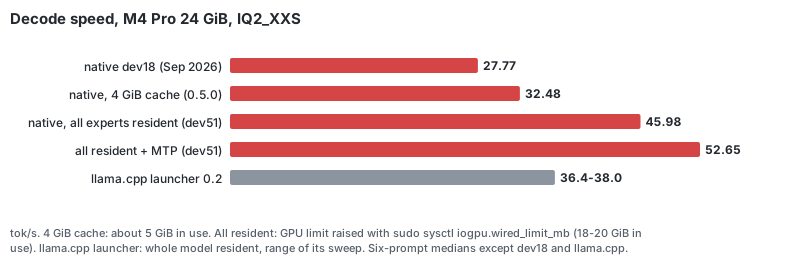
An 80B model on a 24 GiB MacBook Pro: about 45 tok/s decode on an M4 Pro, 49–58 with MTP speculative decoding, which never changes the answer. The llama.cpp launcher reaches 36–38 on the same Mac.
-
A better 2-bit file: Red Lite's own quantization, F2, has the size of Bartowski's IQ2_XXS (19.3 GB) and a 6 % lower perplexity.
-
Checked against llama.cpp on every change: logits, greedy tokens and long contexts, with llama.cpp used as an oracle only, never linked.
-
A local OpenAI-compatible server: tool calling for coding agents such as pi, two requests at once, steering, and prompt states saved to disk.
Install#
With Homebrew (from release 0.5.5; no compiler, no source checkout):
brew tap alfofire2/redlite https://github.com/alfofire2/dwarfstar-red-lite
brew trust --tap alfofire2/redlite     # Homebrew 7 loads formulae from third-party taps only once trusted
brew install redlite
redlite download 24gb && redlite download mtp     # into ~/.redlite/models (REDLITE_MODELS changes it)
redlite doctor && redlite chat
The formula installs prebuilt binaries but has no Homebrew bottle, so Homebrew asks for up-to-date Command Line
Tools. After a macOS upgrade, update them from Software Update if brew install says they are outdated.
From source:
make native                     # builds .deps/redmetal/ and runs the model-free self-tests
python3 -m pip install -U huggingface_hub && ./bin/redlite download 24gb --dir models   # the Red Lite F2 mix (dev58)

M=models/Qwen3-Next-80B-A3B-Instruct-RedLite-F2.gguf   # or Bartowski's: redlite download bartowski-24gb
.deps/redmetal/redlite-generate $M --prompt "Explain in one sentence why the sky is blue." --stats
./bin/redlite chat --stats      # persistent terminal chat; /reset, /help, /quit; Ctrl-C stops an answer
./bin/redlite serve --native $M --port 8080    # OpenAI-compatible /v1/chat/completions (SSE, tool calling) and /v1/models
./bin/redlite serve --native $M --parallel 2   # dev56: two requests at once, decoded in one pass (every expert resident)
.deps/redmetal/redlite-engine info $M          # layout, and the cache that holds every expert of this file
Faster answers with MTP (48 GiB Macs). ./bin/redlite download mtp --dir models fetches the 2.26 GiB
multi-token-prediction head. When it sits in models/ and every expert is resident, redlite chat and
redlite serve --native decode speculatively: one extra token is drafted and checked per step, and the
answer is exactly the one plain decoding gives, with any sampler. Typical gain: +8 % (creative prose) to
+30 % (code, arithmetic). --no-mtp turns it off.
24 GiB Macs: raise the GPU limit for +42 % (+60 % with MTP). macOS lets the GPU use 17.76 GiB on a 24 GiB
Mac, just under what every IQ2_XXS expert needs. ./bin/redlite doctor prints the limit to set. After
sudo sysctl iogpu.wired_limit_mb=21741 (until the next reboot), redlite chat and redlite serve --native keep
every expert resident and use MTP when its head is in models/:
- 32.5 → 46 tok/s, 52.7 with MTP, on an M4 Pro 24 GiB;
- footprint about 18–20 GiB, so close other heavy apps;
- long contexts (dev55): the prefill chunk and MTP are sized to the limit, so a 32K context runs (without MTP). Below 40 GiB, MTP is skipped for answers starting past 8,192 positions, where it stops paying;
- for good: a LaunchDaemon sets the limit at every boot, and
redlite doctorrecognizes it.
Details: docs/REDLITE_DEV51_24GB_DECODE.md, docs/REDLITE_DEV55_LONG_CONTEXT_24GB.md.
Use with a coding agent (dev59, dev60). The server speaks OpenAI tool calling, so agents such as pi work against it with a configuration file only.
- Measured: five scripted coding tasks, three runs each:
- Qwen3-Coder-Next IQ2_XXS passed 15 of 15 on the M4 Max and 14 of 15 on the M4 Pro 24 GiB;
- Red Lite F2 passed 15 of 15 on the M4 Pro 24 GiB, at 6–29 s per task.
- State reuse: each turn reuses the engine state, so the agent's long system prompt is read once per task.
- Harder tasks on this repository (dev62): Qwen3-Coder-Next passed 70 % and F2 50 %, against 83 % for the full-precision model through Qwen's API. For agents, use the coding model.
--parallel 2gains only 2–5 % with agents.- Details:
docs/REDLITE_DEV60_CODING_AGENT.md,docs/REDLITE_DEV62_AGENT_TESTS.md.
npm install -g @earendil-works/pi-coding-agent       # pi itself (Node.js: brew install node)
redlite setup-pi --port 8080                          # adds a "redlite" provider to ~/.pi/agent/models.json
redlite serve --native --context 32768 --port 8080    # or name a file: redlite serve --native PATH/Qwen_Qwen3-Coder-Next-IQ2_XXS.gguf ...
pi --provider redlite --model qwen3-next-80b-a3b-redlite
Steering (dev52). Turn the model's style or topic with a vector added to its residual stream:
python3 scripts/dev/steer_extract.py $M --pos POS.txt --neg NEG.txt --layer 24 --out v.f32   # two prompt sets
./bin/redlite chat --steer v.f32 --steer-layers 12-23 --steer-strength 0.3    # /steer S changes it during the chat
--steer-tokens Nsteers only the start of each answer.- Typical strengths are 0.2–0.5 over 8–12 layers; more breaks the text.
- Exact with MTP.
- The server takes it too:
redlite serve --native $M --steer v.f32 …(dev55). - Details and an example:
docs/REDLITE_DEV52_STEERING.md.
A better 24 GiB file (dev54, dev58): alfodaniello/Qwen3-Next-80B-A3B-Instruct-RedLite-GGUF.
- F2 (dev58), the same size as Bartowski's IQ2_XXS (19.32 GB):
- the dense projections every token reads at Q4_K instead of 2-bit;
- IQ2_XS experts on layers 40–47.
- Perplexity: 16.370 (Bartowski's scheme) → 16.216 (E3, dev54) → 15.379 (F2).
- Answers identical to Qwen's API: 2 / 4 / 5 of 235.
- Speed: plain decode 3 % slower than E3; with MTP on a 24 GiB Mac as fast or faster.
redlite download 24gbfetches F2 (e3the previous file), andredlite chatprefers it.- Details:
docs/REDLITE_DEV54_QUANT_MIX.md,docs/REDLITE_DEV58_DENSE_PRECISION.md. - Higher quality on 24 GiB (dev61): the 48 GiB file (
redlite download 48gb, IQ3_XXS, perplexity 14.29) streams from the SSD with the 4 GiB cache at 29 tok/s on an M4 Pro (F2: 34). Pass its path:redlite chat …/Qwen_Qwen3-Next-80B-A3B-Instruct-IQ3_XXS.gguf.
Long prompts that come back. --state-dir DIR (generate and server) saves the engine state of a prompt's
prefix to disk; the next run, or a restarted server, with the same prefix skips its ingestion. A restored
session is bit-identical to a cold one.
On a Mac with 40 GiB or more, put Bartowski's Qwen_Qwen3-Next-80B-A3B-Instruct-IQ3_XXS.gguf
in models/ too: redlite chat then picks it (see Chat defaults). A release tarball of
the three binaries is built by scripts/package_release.sh.
Chat defaults.
- Model (when no path is given): the best file in
models/for this machine — IQ3_XXS when RAM ≥ 40 GiB and its experts plus dense weights stay below 75 % of RAM, else IQ2_XXS. - Context: 4096 positions (
--context). - Answer length: 256 tokens.
- Temperature: 0.7 (
--temperature 0is greedy and deterministic). - Expert cache: with 40 GiB or more, every expert of the file resident and preloaded,
sized from the file's expert payload (17,316 MiB for IQ2_XXS, 28,800 MiB for IQ3_XXS since dev37;
--cache-mib fullin the binaries); tokens are then routed on the GPU in one command buffer. Otherwise 4096 MiB. - Prompts are ingested by a batched prefill in chunks of 2048 tokens (
--batch); with a bounded cache a larger chunk means fewer expert reloads (dev34).
Sampler. It follows llama.cpp's chain (top-k → top-p → min-p → temperature) with the same arithmetic. min-p is off by default here and 0.05 in llama.cpp.
Server. Requests run one at a time in arrival order (FIFO queue, --queue); /health
answers meanwhile. A request that continues the previous conversation exactly reuses the
engine state and only ingests the new tokens (second-turn first token 3.8 s → 0.17 s on
an 1185-token conversation); any other request resets. stop sequences are supported.
FAQ#
Can I run an 80B model on a 24 GB Mac? Yes, this one. Qwen3-Next-80B-A3B is a sparse mixture of experts: a token uses about 3B of its 80B parameters.
- Default: Red Lite keeps about 1.4 GiB of dense weights and a 4 GiB expert cache in memory and reads the rest from the SSD. That gives 34 tok/s on an M4 Pro 24 GiB with F2, with nothing to configure.
- Raised GPU limit: with
sudo(see 24 GiB Macs above) every expert stays on the GPU: 45 tok/s, 49–58 with MTP.
How is it different from DwarfStar? DwarfStar (antirez/ds4) by Salvatore Sanfilippo runs DeepSeek V4 and GLM on large Macs. Red Lite applies the same idea to another model, Qwen3-Next, and a smaller Mac:
- one model family;
- hardware-specific code;
- dense weights treated apart from the routed experts.
It shares no code with DwarfStar. If you want those models on a big Mac, use DwarfStar. If you want an 80B model on a 24 GB Mac, try this. More in The name, and DwarfStar.
How does it compare with llama.cpp, Ollama, LM Studio or MLX?
- llama.cpp, the only one measured here, on the same files:
- on an M4 Max 48 GiB, Red Lite decodes 19 % faster (86.2 vs 72.5 tok/s);
- on an M4 Pro 24 GiB, 45–46 tok/s against 36–38.
- Ollama, LM Studio and MLX were not measured.
- What Red Lite adds: its own expert streaming for Macs where the model does not fit, MTP speculative decoding, and tool calling for agents, all for this one model.
Which Mac do I need?
- Tested: Apple Silicon with 24 GiB or more, on an M4 Pro 24 GiB and an M4 Max 48 GiB.
- Built for but never run: M1, M2 and M3 (the release binaries are built for M1 and later).
- Never tried: 16 GiB.
- Disk: 19.3 GB for the 24 GiB file, 31.7 GB for the 48 GiB one.
Does it work with coding agents and the OpenAI API?
Yes. redlite serve --native speaks the OpenAI chat API with tool calling, and redlite setup-pi configures the pi
coding agent. On harder tasks Qwen3-Coder-Next at 2 bits passed 70 % against 83 % for the full-precision model
(dev62).
Is the output the same as the original model?
- What the files are: 2-bit quantizations (19.3 GB instead of 160 GB), so answers differ from the full-precision model. Red Lite's F2 file has a 6 % lower perplexity than the usual IQ2_XXS of the same size.
- What matches: the runtime gives the same tokens as llama.cpp on the same file, which is checked on every change.
What runs#
- Model: Qwen3-Next-80B-A3B-Instruct.
- 24 GiB Macs: Red Lite's F2 file (19.3 GB,
redlite download 24gb), or the reference file it was validated against, Bartowski'sQwen_Qwen3-Next-80B-A3B-Instruct-IQ2_XXS.gguf(17.97 GiB). - 48 GiB Macs: Bartowski's
…-IQ3_XXS.gguf(29.55 GiB, perplexity 14.29), with every expert resident. - Since dev42 also
Qwen/Qwen3-Coder-Next: same architecture, Bartowski IQ2_XXS / IQ3_XXS, validated against llama.cpp.
- 24 GiB Macs: Red Lite's F2 file (19.3 GB,
- Hardware: Apple Silicon, macOS only. Designed for 24 GiB of unified memory, and developed since September 2026 on a 48 GiB M4 Max.
- Goal: run an 80B-total / 3B-active sparse MoE locally without pretending that the whole model fits in memory.
Qwen3-Next has 48 layers: 36 Gated DeltaNet blocks and 12 full-attention blocks, each followed by a 512-expert MoE that selects 10 experts per token. Only about 1 GiB of the weights is dense. The other ~17 GiB are routed experts, of which a token touches about 3%. Red Lite keeps the dense part resident and treats the experts as a cache.
Two runtimes#
| Native runtime (0.3 and later) | Launcher (0.2) | |
|---|---|---|
| What runs the model | Red Lite's own C11 / Objective-C / Metal implementation of the Qwen3-Next graph | a pinned llama.cpp (Metal), or a pinned CPU mmap runtime for oversized models |
| Memory model | dense weights mapped in place; routed experts in a bounded LRU cache (--cache-mib, 4 GiB on 24 GiB machines) or all resident (--cache-mib full) |
whole model resident, or CPU mmap with bounded expert residency |
| Entry points | redlite chat, redlite serve --native, redlite-generate, redlite-server |
redlite plan / run / serve / bench |
| Correctness reference | pinned llama.cpp, used as a test oracle only and never linked | llama.cpp itself |
| Validated on | M4 Max 48 GiB and M4 Pro 24 GiB (regression suite at every release) | M4 Pro 24 GiB |
Measured performance#
In short:
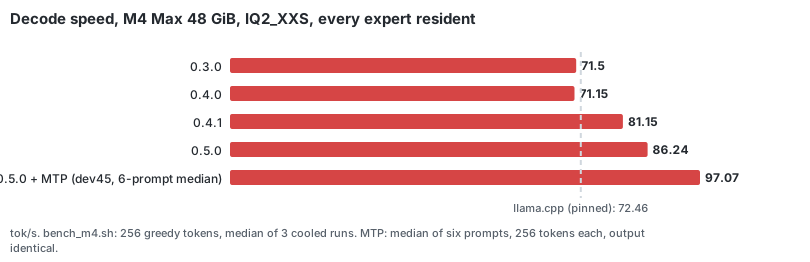
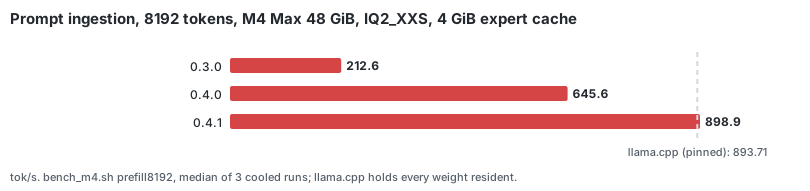
- 48 GiB, every expert resident: decode is 19 % faster than the pinned llama.cpp (86.2 vs 72.5 tok/s, 0.5.0), 97 tok/s with MTP (median of six prompts, +20 % over plain decoding). Prompt ingestion went from 4× slower than llama.cpp (0.3.0) to on par.
- 24 GiB: with the 4 GiB cache the native runtime uses about 5 GiB and decodes 32–33 tok/s. With the GPU
limit raised (
sudo sysctl iogpu.wired_limit_mb=21741, until reboot), every expert is resident: 46 tok/s, 52.7 with MTP (identical output), above the llama.cpp launcher's 36–38. Prompts are ingested at about 360 tok/s. - Why, and what did not work: docs/FINDINGS.md. The charts are drawn from
benchmarks/charts.jsonbyscripts/dev/make_charts.py.
Method. Greedy decode of 256 tokens after a short chat prompt; prefill of the first
N ids of tests/fixtures/long_context_prompt.txt; scripts/dev/bench_m4.sh --reps 3 --cool 90, median of three cooled runs; the pinned llama.cpp measured on the same ids
(--only llama, fully resident, its default batch sizes). Records:
benchmarks/m4max-48gb-0.4.1.json (0.4.1), benchmarks/m4max-48gb-0.4.0.json (0.4.0) and the
older files listed below. Nothing is extrapolated from one machine to another.
0.5.0, M4 Max 48 GiB (2026-10-03, clean build; benchmarks/m4max-48gb-0.5.0.json):
- Every expert resident:
- decode IQ2_XXS 86.24 tok/s, IQ3_XXS 79.91 tok/s;
- with MTP, 87–104 tok/s on IQ2_XXS depending on the text;
- prompt ingestion at 8192 tokens 917–927 / 902–912 tok/s.
- Short-prompt and 4 GiB-cache numbers varied too much between runs that session to be compared with 0.4.1; every run is in the record.
0.4.1, M4 Max 48 GiB (commit 9bb6e41 sources, clean build, 2026-10-01; prefill with the engine's default 2048-token chunks at both cache sizes):
| GGUF | Expert cache | Decode | Prefill 1100 tokens | Prefill 8192 tokens |
|---|---|---|---|---|
| IQ2_XXS | full (17,316 MiB) | 81.15 tok/s | 900.4 tok/s | 921.5 tok/s |
| IQ2_XXS | 4 GiB | 52.89 tok/s | 808.9 tok/s | 898.9 tok/s |
| IQ3_XXS | full (28,800 MiB) | 76.88 tok/s | 876.7 tok/s | 917.5 tok/s |
| IQ3_XXS | 4 GiB | 49.59 tok/s | 763.0 tok/s | 889.2 tok/s |
The pinned llama.cpp on the same ids (0.4.0 measurement, unchanged pin): IQ2_XXS 72.46 / 858.3 / 893.7, IQ3_XXS 68.54 / 861.3 / 900.7 tok/s (decode / prefill 1100 / 8192); IQ3_XXS prefill 1100 re-measured 2026-10-01: 878.8.
0.4.0, M4 Max 48 GiB:
| GGUF | Expert cache | Decode | Prefill 1100 tokens | Prefill 8192 tokens | llama.cpp decode / prefill 1100 / 8192 |
|---|---|---|---|---|---|
| IQ2_XXS | full (21,312 MiB), chunks of 2048 | 71.15 tok/s | 891.9 tok/s | 926.9 tok/s | 72.46 / 858.3 / 893.7 |
| IQ2_XXS | 4 GiB, chunks of 512 | 47.77 tok/s | 545.8 tok/s | 645.6 tok/s | — |
| IQ3_XXS | full (29,376 MiB), chunks of 2048 | 63.39 tok/s | 786.0 tok/s | 860.3 tok/s | 68.54 / 861.3 / 900.7 |
| IQ3_XXS | 4 GiB, chunks of 512 | 43.8 tok/s (36.9–46.9) | 428.4 tok/s (401–509) | 588.3 tok/s | — |
The IQ3_XXS 4 GiB rows vary with the page cache (the 31.7 GB file does not stay cached
next to other runs' 29 GiB of expert slots). The 0.3.0 native runtime did 71.50 / 47.93
tok/s decode and 307.3 / 212.6 tok/s prefill on the IQ2_XXS file under the same method
(docs/REDLITE_DEV28_CI_RELEASE.md).
Earlier measurements:
| Machine | Build | Expert cache | Decode, short context | Decode @ ~4096 | Decode @ ~8192 | Prompt ingestion |
|---|---|---|---|---|---|---|
| M4 Max 48 GiB | native 0.3.0 | 22 GiB (all resident) | 69.8–72.7 tok/s | 63.8–65.5 tok/s | 56.3–57.4 tok/s | 1100 tokens: 314.3 tok/s (4 GiB cache) |
| M4 Max 48 GiB | native 0.3.0 | 4 GiB | 46.5–50.1 tok/s | 42.3–43.6 tok/s | 38.8–39.2 tok/s | 4096 tokens: ~266 tok/s, 8192 tokens: ~203 tok/s |
| M4 Pro 24 GiB | native dev18 (280f788) |
4 GiB | 27.8 tok/s | not measured | not measured | 16.3 tok/s (token by token; there was no batched prefill yet) |
| M4 Pro 24 GiB | launcher 0.2 (llama.cpp Metal, resident) | n/a | 36.4–38.0 tok/s | — | — | 236.7–258.8 tok/s (256-token prompts) |
Records of the earlier rows: benchmarks/m4max-48gb-native-dev19.json (dev19–dev26),
benchmarks/m4pro-24gb-native-dev18.json, benchmarks/m4pro-24gb-sweep-2026-09-02.json
(the launcher's 4K/8K rows there are context sizes, not decode positions).
M4 Pro 24 GiB, dev47 build (commit 91481ea, 2026-10-02, AC power, IQ2_XXS, 4 GiB cache;
scripts/dev/small_mac_session.sh): decode 33.00 tok/s, prefill 280.8 tok/s (1100 tokens) and 349.8 tok/s
(8192 tokens); native outputs bit-identical to the M4 Max's. Record: benchmarks/m4pro-24gb-2026-10-02.json,
docs/REDLITE_DEV47_LONG_CONTEXT.md. Nothing has been measured on a 16 GiB Mac.
Correctness#
- Greedy output is token-identical to the pinned llama.cpp on the regression prompts,
for both GGUFs (
scripts/regress_m4.sh MODEL: 49 checks on IQ2_XXS; on IQ3_XXS 36 checks, plus 13 dense stage tools that only know the IQ2_XXS layout and are skipped). - Logits match llama.cpp: short context KL ≤ 1e-5 (IQ3_XXS: 1.4e-12); after an 1100-token prompt max-logit difference ≤ 2.0 and KL ≤ 2e-2; at 4096 and 8192 positions every argmax agrees over 100 steps.
- Dequantization. The CPU reference decodes every quant type of both files
bit-identically to ggml's own
to_float(scripts/dev/dequant_check.sh). - Kernels. Every kernel change is gated by a CPU-oracle parity run: a double-precision implementation of the same graph in the same process. Any router top-k divergence fails the gate.
- Model-free tests. The GGUF readers are fuzzed. The model-free tests run under
ASan/UBSan (
make sanitize), and so does a real chat turn.scripts/dev/local_ci.shruns every model-free check before a merge. - What did not work:
docs/WHAT_DID_NOT_WORK.mdlists every reverted attempt, trap and unreached target with its measurement. - Details:
docs/REDLITE_DEV18_ENGINE.md(the engine);docs/REDLITE_DEV22_*todocs/REDLITE_DEV26_*(0.3.0 performance);docs/REDLITE_DEV28_*todocs/REDLITE_DEV32_*(0.4.0).
Limits#
- Two files. The native runtime is validated on Bartowski's IQ2_XXS and IQ3_XXS GGUFs of Qwen3-Next-80B-A3B-Instruct. Routed experts may be IQ2_XS, IQ1_M, IQ3_XXS or IQ3_S; dense tensors F32, Q8_0, Q2_K, Q4_K, Q5_K, Q6_K, IQ2_XXS, IQ2_S, IQ3_XXS, IQ3_S or IQ4_XS. Other files of the same model use more types and are not supported natively (the launcher handles them).
- One or two sequences. By default the server runs one request at a time (others wait in a FIFO queue) and
keeps the state of the last conversation only: a request that extends it exactly reuses it, any other request
resets the engine. With every expert resident,
--parallel 2serves two at once (dev56). - Tested only on Apple M4 chips (M4 Pro 24 GiB and M4 Max 48 GiB). The release binaries are built for M1 and later, and the Metal kernels compile on any Apple GPU, but M1, M2 and M3 have never run them.
- macOS 27.0.1 GPU driver. On an M4 Max with macOS 27.0.1, the Mac kernel-panicked twice in Apple's GPU driver
(
IOGPUFamily) while Red Lite ran Metal work; never on macOS 26. The cause is in the driver, not in Red Lite; avoid running other GPU-heavy programs at the same time. Details:docs/WHAT_DID_NOT_WORK.md. - Full residency (
--cache-mib 22528, GPU-routed decode) needs a Mac with at least 40 GiB of RAM. - Throughput depends on the page cache. On a machine whose page cache cannot hold the
GGUF, expert misses become SSD reads. The expert prefetch (
RL_ENGINE_PREFETCH=0turns it off) may help less there, or hurt. - Long contexts slow down decode. Decode attention is linear in the position (split-K above 256 positions). Prompt ingestion does not slow down (dev30: tiled attention; ~890 / ~930 tok/s at 1100 / 8192 tokens with full residency on the M4 Max).
- Quantization. IQ2_XXS is a very low-bit quantization. Red Lite reproduces llama.cpp on this file; it does not improve the file's quality.
Problems?#
Open an issue and include:
- the output of
redlite doctor: Mac model, chip, RAM, macOS version, GPU limit and which binaries were found; - the command you ran and its full output;
- the model file (
redlite modelslists the known ones).
Red Lite has only run on Apple M4 chips so far. A report from an M1, M2 or M3 Mac is useful even when everything
works: say which chip it was and paste the --stats line of one answer.
Tools#
| Status | Tools |
|---|---|
| Product | redlite chat, redlite serve --native, redlite-generate, redlite-server, redlite-engine (info, tokenize, logits, parity, prefill, kernel-selftest) |
| Launcher (0.2 path, M4 Pro-validated) | redlite doctor / plan / run / serve / bench / sweep / bootstrap / download |
| Regression | scripts/regress_m4.sh; scripts/dev/quick_parity.sh, bench_m4.sh, long_positions.sh, sanitize_chat.sh; the stage parity CLIs in .deps/redmetal/ (redlite-ffn, redlite-deltanet-*, redlite-attention*, redlite-decoder-stack, redlite-native topk-parity, …). The stage CLIs validated each graph stage (dev9–dev17) and are kept as regression tools; redlite-engine supersedes them for inference. |
| Legacy | the Python streaming oracle redlite-stream, redlite-ffn (Python) and redlite-topk (dev1–dev8). It is frozen and kept as a numerical reference; its --help says so. |
Launcher (0.2)
The sections below describe the llama.cpp-based launcher: the memory planner, the pinned engines and the M4 Pro 24 GiB presets. It remains the field-validated path on the 24 GiB M4 Pro.
Launcher (0.2): requirements and quick start#
The launcher runs the pinned llama.cpp or the oversized-MoE CPU runtime instead of the native engine. For the native runtime, see Install.
Requirements#
- Apple Silicon Mac (
arm64) - macOS
- Xcode Command Line Tools (
xcode-select --install) - CMake
- Git
- Python 3.10+
- Fast internal SSD strongly recommended for oversized mode
- Enough free disk for model + build trees
24 GB configurations#
| Mode | Quant | Approx file size | Backend | Trade-off |
|---|---|---|---|---|
| Fastest practical resident | IQ2_XXS | ~19.3 GB | Metal | Very low quant quality; M4 Pro 24 GiB field profile defaults to 4K, other unvalidated tight 24 GiB profiles remain at 2K |
| Slightly better quant | IQ2_XS | ~22.2 GB | SSD/CPU by default | Too tight for conservative 24 GB Metal budget |
| Quality profile | Q4_K_M | ~48.4 GB | SSD/CPU | Much better quant quality, heavy SSD traffic |
The planner uses the actual GGUF file size, not the marketing parameter count.
Field-validated M4 Pro / 24 GiB presets#
For the 17.97 GiB Bartowski IQ2_XXS model on Apple M4 Pro 24 GiB:
- 2K: conservative
- 4K: default
- 8K: experimental
A controlled sweep completed all three depths with zero observed swap growth:
| Context | Prompt tok/s | Generation tok/s | Swap delta |
|---|---|---|---|
| 2048 | 258.8 | 38.0 | +0.00 GiB |
| 4096 | 247.2 | 36.4 | +0.00 GiB |
| 8192 | 236.7 | 36.9 | +0.00 GiB |
The planner still labels these fits CRITICAL because the estimated headroom remains below 1 GiB. See docs/FIELD_VALIDATION_M4PRO_24GB.md.
Quick start#
1. Install the Red Lite CLI#
cd dwarfstar-red-lite
./scripts/install.sh
redlite doctor
Or without installing:
./bin/redlite doctor
2. Build the two pinned engines#
redlite bootstrap
This builds:
- a Metal-enabled pinned
llama.cppfor resident Qwen3-Next; - a CPU-only pinned Oversized MoE Runtime for mmap + bounded expert residency.
Dependencies are placed in .deps/ and are not committed to this project.
3. Download the 24 GB profile#
python3 -m pip install -U huggingface_hub
redlite download 24gb --dir models
The 24gb alias selects the IQ2_XXS build.
For a higher-quality oversized model:
redlite download quality --dir models
4. Ask the planner what to do#
redlite plan models/Qwen_Qwen3-Next-80B-A3B-Instruct-IQ2_XXS.gguf
On the field-validated Apple M4 Pro / 24 GiB profile, the default is now:
mode             : metal-resident
status           : CRITICAL
context          : 4096
budget pass      : YES
For other unvalidated tight 24 GiB machines, the planner remains conservative and may choose 2048.
For Q4_K_M the planner should choose:
mode : ssd-cpu
5. Run locally#
redlite run models/Qwen_Qwen3-Next-80B-A3B-Instruct-IQ2_XXS.gguf \
  -p "Write a small Python HTTP server and explain it." \
  -n 512
6. Start an OpenAI-compatible server#
redlite serve models/Qwen_Qwen3-Next-80B-A3B-Instruct-IQ2_XXS.gguf \
  --host 127.0.0.1 \
  --port 8080
Then call it as a normal local OpenAI-style endpoint:
curl http://127.0.0.1:8080/v1/chat/completions \
  -H 'Content-Type: application/json' \
  -d '{
    "model": "local",
    "messages": [{"role":"user","content":"Hello from Red Lite"}],
    "stream": false
  }'
CLI#
redlite doctor
redlite pressure
redlite models
redlite bootstrap
redlite download [24gb|balanced|quality]
redlite plan MODEL.gguf
redlite chat [MODEL.gguf]
redlite run MODEL.gguf
redlite serve MODEL.gguf
redlite bench MODEL.gguf
redlite sweep MODEL.gguf --contexts 2048,4096,8192
Override the execution path#
redlite plan MODEL.gguf --mode metal-resident
redlite plan MODEL.gguf --mode ssd-cpu
Red Lite will reject a forced resident plan if its conservative RAM budget says the
model does not fit. run/serve expose --force, but it should be used only for
experiments.
The name, and DwarfStar#
Red Lite is an independent project, named after and inspired by DwarfStar (antirez/ds4) by Salvatore Sanfilippo (antirez). It takes from DwarfStar its narrow, hardware-aware philosophy and several ideas: MTP verify, steering, checking answers against the model maker's API. It shares no code with it and is not affiliated with it.
Why "Red Lite". Red dwarfs are the smallest and coolest true stars, still burning hydrogen, and the most common ones. DwarfStar Red Lite is the small red dwarf of the family: the same idea, made to fit the smallest Apple Silicon Mac that can hold an 80B model, 24 GiB. The logo is that star, with one ray per model layer: the 12 long red rays are the full-attention layers, the 36 short ones the Gated DeltaNet layers.
Why not just call this a DwarfStar fork?#
DwarfStar currently has its own narrow tensor layouts and model implementations for DeepSeek V4 / GLM. Qwen3-Next is a genuinely different graph: Gated DeltaNet, periodic full attention and a 512-expert MoE. Pretending that changing a model enum would make DS4 compatible would be misleading.
Red Lite instead adapts the DwarfStar design approach:
- one model family, not a generic UI wrapper;
- hardware-specific defaults;
- asymmetric treatment of hot/dense tensors vs routed experts;
- SSD-backed execution when RAM is insufficient;
- integrated local CLI/server experience;
- deterministic, pinned inference engines.
For mathematical correctness of Qwen3-Next, the first usable release (0.2) delegated the model graph/kernels to a pinned llama.cpp revision that already implements the architecture. 0.3 adds the native runtime, whose hand-written Gated DeltaNet, attention and MoE kernels were each validated against a CPU oracle and the pinned llama.cpp before being used.
What is and is not validated#
This section covers the launcher. For the native runtime, see Measured performance, Correctness and Limits above.
Red Lite has completed real field validation on an Apple M4 Pro with 24 GiB unified memory using the 17.97 GiB Bartowski IQ2_XXS build of Qwen3-Next-80B-A3B-Instruct.
Interactive Metal inference succeeded at 2K with observed generation throughput of roughly 30.7–40.7 tok/s. A later controlled sweep completed 2K, 4K and 8K with zero observed swap growth, measuring approximately 38.0, 36.4 and 36.9 generation tok/s respectively.
The Python control plane and memory-policy tests are also validated. The oversized Q4 path is based on a separately validated 48.41 GB Qwen3-Next run on a 16 GB M1. Field numbers are observations, not guarantees: macOS memory pressure depends on other processes, context size, build revision and GGUF layout.
See:
docs/FIELD_VALIDATION_M4PRO_24GB.mdbenchmarks/m4pro-24gb-sweep-2026-09-02.json
Development#
Run tests:
make test
scripts/dev/local_ci.sh runs the model-free checks (ruff, make native, make sanitize,
make test) on macOS or Linux; there is no hosted CI. Everything that needs
Metal or the model runs locally with scripts/regress_m4.sh MODEL.
Build a binary release tarball (Apple Silicon only; -mcpu=apple-m1, macOS ≥ 14):
scripts/package_release.sh          # dist/redlite-<version>-macos-arm64.tar.gz + .sha256 (binaries + python/redlite)
python3 scripts/dev/brew_formula.py <version>   # Formula/redlite.rb for that tarball; commit it after the release
Inspect the launch command without executing it:
redlite run MODEL.gguf --dry-run
redlite serve MODEL.gguf --dry-run
See:
docs/FINDINGS.md: results and charts;docs/README.md: every milestone, with what was measured where;docs/ROADMAP.md;- the launcher (0.2):
docs/ARCHITECTURE.md,docs/MEMORY.md,docs/BENCHMARK.md,docs/DS4_ADAPTATION.md; NOTICE.md.
License#
Red Lite's own code is MIT licensed. Third-party engines retain their upstream MIT
licenses and notices. See NOTICE.md.