Red Lite · local inference on a 24 GB Mac
Run an 80B model on a 24 GB Mac.
DwarfStar Red Lite is a narrow C, Objective-C and Metal engine for one model family, Qwen3-Next-80B-A3B and Qwen3-Coder-Next. It streams experts from the SSD, decodes speculatively without changing the answer, and serves an OpenAI-compatible API to your coding agent.
SUPPORTED: QWEN3-NEXT 80B + QWEN3-CODER-NEXT · MIT LICENSE · C / OBJECTIVE-C / METAL · 80B ON 24GB
Principle · a sparse model on a small Mac
Phase 1 · the giant
An 80-billion-parameter star
Qwen3-Next-80B-A3B: 48 layers with 512 experts each. At full precision that is 160 GB, far beyond a laptop. The usual answer is a server; Red Lite starts from the opposite constraint.
Phase 2 · the router
Each token lights 3% of it
In every layer a router picks 10 of the 512 experts. A token reads about 3 billion parameters; everything else can wait on the SSD.
Phase 3 · the red dwarf
Small, hot, yours
Dense weights resident, experts cached from the SSD, a 2-bit file 6% better than the usual one. It fits a 24 GB Mac. The 48 rays are the model's layers: the 12 long ones are its full-attention layers.
Design choices
Narrow on purpose: one model family, checked end to end.
Not a generic GGUF runner. Every kernel of the Qwen3-Next graph was checked against a CPU reference and against llama.cpp before it was used; llama.cpp is a test oracle, never linked.
Experts as a cache on the SSD
The dense 1.4 GiB stays resident; the experts live in a bounded cache read from the SSD, with routing that prefers what is already loaded (at most 0.2% perplexity cost).
A better 2-bit file
Red Lite's F2 gives the weights every token reads 4.5 bits instead of 2, at the same size: 6% lower perplexity than the usual IQ2_XXS.
One engine, every interface
redlite chat in the terminal, redlite serve for the OpenAI API with tool calling,
and coding agents on top. All share one engine state.
Architecture
How Red Lite fits together.
Hugging Face GGUFs in, one Metal engine in the middle, a chat, an API and your agent out.
RUNTIME MAP · SIMPLIFIED. SEE THE ENGINE NOTES FOR THE FULL DRAWING.
Run it
Run Red Lite in three steps.
Homebrew installs prebuilt binaries; the model comes from Hugging Face. From source: see the README.
STEP 1 · INSTALL
$ brew tap alfofire2/redlite \
    https://github.com/alfofire2/dwarfstar-red-lite
$ brew trust --tap alfofire2/redlite
$ brew install redlite
STEP 2 · FETCH THE WEIGHTS
$ redlite download 24gb   # 19.3 GB
$ redlite download mtp    # 2.4 GB
# 48 GB Mac: redlite download 48gb
STEP 3 · TALK TO IT
$ redlite doctor
$ redlite chat
$ redlite serve --native  # or an API
Fit check
Will it run on your Mac?
Pick your chip and memory for a starting point. Numbers come from the two Macs it was measured on; everything else is said to be untested.
Benchmarks
Prefill and generation, measured.
Every row names the Mac it was measured on and has a record in the repository. Read prefill and generation separately: agents spend most of their time on prefill.
| MACHINE | FILE | MODE | PREFILL T/S | GENERATION T/S |
|---|---|---|---|---|
| M4 Pro, 24 GB | F2 | 4 GiB cache, SSD | 350 · 367 | 34 |
| M4 Pro, 24 GB | F2 | every expert resident | ~360 | 45 · 49–58 MTP |
| M4 Pro, 24 GB | IQ3_XXS | 4 GiB cache, SSD | 208 · 334 | 29 |
| M4 Max, 48 GB | IQ3_XXS | every expert resident | 902–912 | 80 |
| M4 Max, 48 GB | IQ2_XXS | every expert resident | 917–927 | 86 · 97 MTP |
Prefill at 1,100 · 8,192 tokens where two numbers are given, else at 8,192. Against the pinned llama.cpp on the same file, generation is 19% faster on the M4 Max (86.2 vs 72.5 tok/s). All benchmarks →
API & agents
Use Red Lite from your coding agent.
redlite serve --native speaks the OpenAI chat API with tool calling, rendered exactly as the
model's own chat template, so an agent's turns keep the engine state instead of re-reading the prompt.
redlite setup-pi configures the pi agent in one command.
/v1/chat/completions · /v1/models · tools · streaming
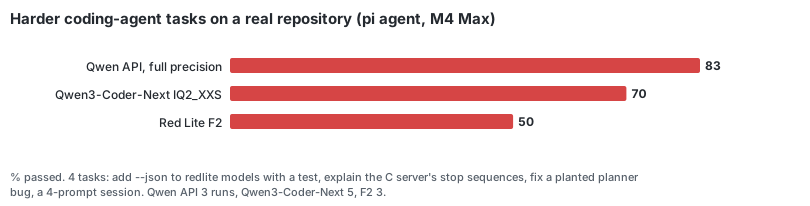
On harder tasks on a real repository, Qwen3-Coder-Next at 2 bits passed 70% against 83% for the full-precision model.
FAQ
Questions.
Can I run an 80B model on a 24 GB Mac?
Yes, Qwen3-Next-80B-A3B: a token uses about 3B of its 80B parameters. By default Red Lite keeps about 1.4 GiB of dense weights and a 4 GiB expert cache in memory and reads the rest from the SSD: 34 tok/s on an M4 Pro 24 GiB. With a raised GPU limit every expert stays on the GPU: 45 tok/s, 49–58 with MTP.
How is it different from DwarfStar?
DwarfStar (antirez/ds4) by Salvatore Sanfilippo is the original project. Red Lite applies its idea to another model, Qwen3-Next, and a smaller Mac. It shares no code with DwarfStar and is not affiliated with it; the name is a tribute: red dwarfs are the smallest true stars.
How does it compare with llama.cpp, Ollama, LM Studio or MLX?
Against llama.cpp on the same files: 86.2 vs 72.5 tok/s on an M4 Max 48 GiB, 45–46 vs 36–38 on an M4 Pro 24 GiB. Ollama, LM Studio and MLX were not measured.
Which Mac do I need?
Apple Silicon with 24 GB of memory or more. Tested on an M4 Pro 24 GiB and an M4 Max 48 GiB. M1, M2 and M3 should work but have not been tested; reports are welcome.
Is the output the same as the original model?
The files are 2- and 3-bit quantizations, so answers differ from the full-precision model. The runtime itself gives the same tokens as llama.cpp on the same file, checked on every change.
Own your local 80B.
Start with the three steps, check your Mac, then point your agent at your own machine. If it runs for you, a star on GitHub helps other people find it.